Updated
8 Best AI Email Assistants in 2026 (Tested and Compared)
By Chris Stefaner, Co-founder of Swizero
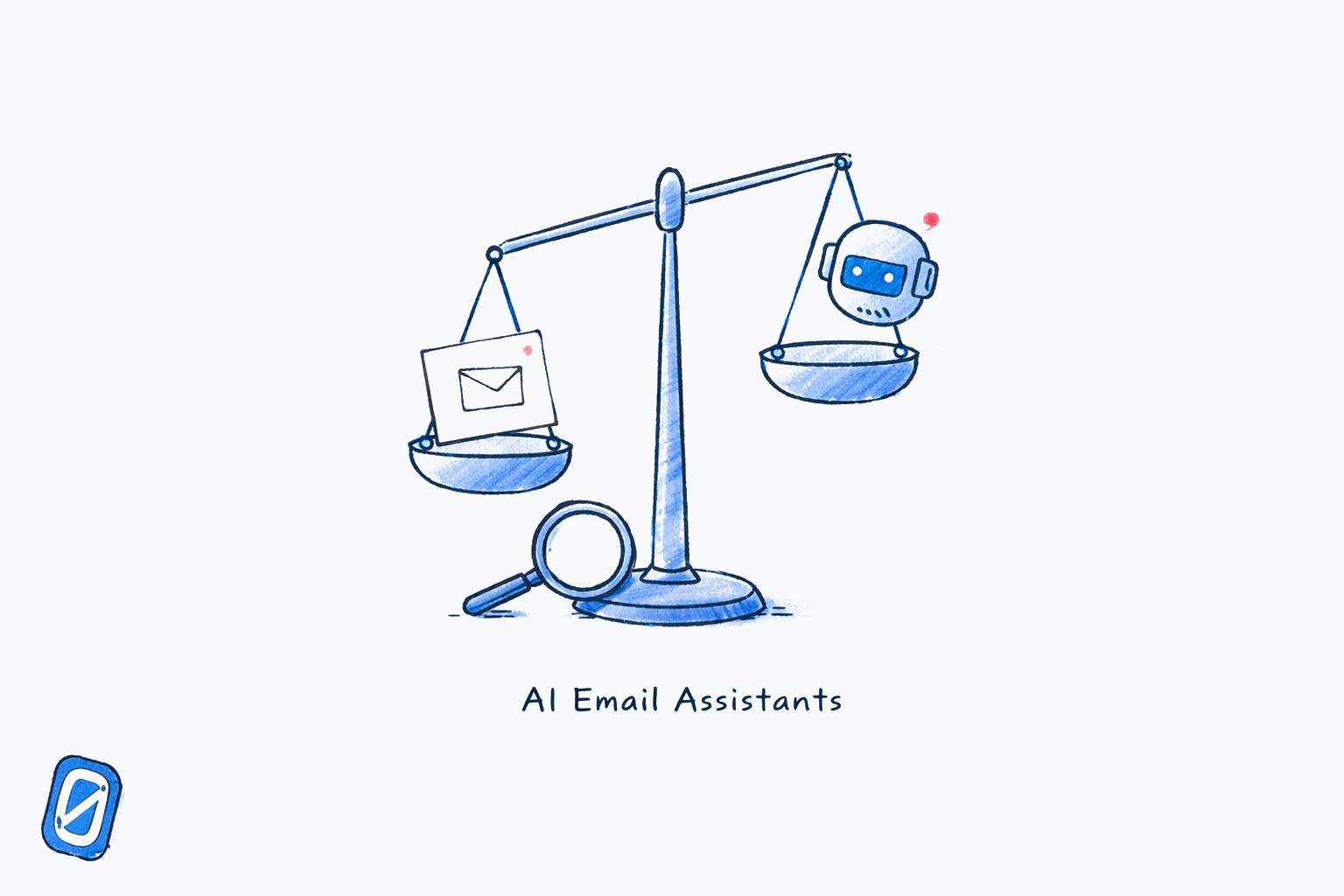
The best AI email assistant in 2026 is the one that matches how you actually want to use email, not the one with the longest feature list. After testing eight tools across real inboxes over several months, the differences that matter most have nothing to do with which AI model generates the smartest draft. They have everything to do with what each tool believes email is for.
Some of these tools want to make your infinite inbox faster. Others want to make it shorter. One wants to make it finite. That distinction shapes every feature decision downstream, and it is the single most useful lens for choosing between them.
Key Takeaway
The eight best AI email assistants in 2026 split into three camps: speed tools that make infinite email faster (Superhuman, Shortwave), filtering tools that reduce noise without changing the inbox model (SaneBox, Clean Email, Canary Mail), and structural tools that impose limits on what reaches you (Swizero). Fyxer and Lindy sit between categories as autonomous agents that take action on your behalf. The right choice depends on whether you want a faster inbox, a quieter inbox, or a finished one.
Here is what we found about each one, what it costs, what it does well, and where it falls short.
Why Does Choosing an AI Email Assistant Matter Now?#
The AI email assistant market is projected to reach $1.13 billion in 2026, growing at a 25.8% compound annual rate according to Precedence Research’s AI Email Assistant Market report. That growth reflects a genuine problem. Microsoft’s 2025 Work Trend Index, which analysed trillions of anonymised productivity signals, found the average knowledge worker receives 117 emails a day and is interrupted every two minutes across mail, chat and meetings, roughly 275 interruptions in a working day. Email is not one task among many. It is the connective tissue of the interruption problem.
The tools in this comparison take meaningfully different approaches to solving that problem. Choosing the wrong one does not just waste a subscription fee; it locks you into someone else’s assumptions about how email should work. If your inbox has no finish line, better AI for infinite email is an incomplete solution. If all you need is faster drafts, a tool that restructures your entire inbox model is overkill.
This guide compares the eight strongest options honestly, including pricing, AI capabilities, and the specific tradeoffs each one makes.
The Full Comparison: 8 AI Email Assistants Ranked#
Here is the landscape at a glance before we go tool by tool.
| Tool | Best For | AI Approach | Email Providers | Starting Price |
|---|---|---|---|---|
| Swizero | Finishing email, not just processing it | AI ranking + fixed card limit | Gmail | $9.99/mo |
| Superhuman | Maximum speed on high volume | Auto Drafts, Auto Labels, voice learning | Gmail, Outlook | $33/mo |
| Shortwave | Gmail power users who want deep AI | Ghostwriter, RAG search, Tasklets | Gmail only | $7/mo |
| Fyxer | Hands-off inbox triage + meeting notes | Autonomous sorting, AI drafts, meeting transcription | Gmail, Outlook | $30/mo |
| Lindy | Building custom email automations | Agentic AI with multi-step workflows | Gmail, Outlook | Free (400 credits) |
| SaneBox | Quiet filtering without switching apps | Behavioral pattern matching on headers | Any IMAP provider | $7/mo |
| Canary Mail | Privacy-first AI email | On-device AI + end-to-end encryption | Gmail, Outlook, iCloud | Free (AI from $3/mo) |
| Clean Email | Bulk inbox cleanup and maintenance | Metadata-based sorting and automation rules | Any IMAP provider | Free (Premium $2.50/mo) |
Annual Cost of AI Email Assistants (Lowest Paid Plan)
Source: Official pricing pages, May 2026
Swizero: Best AI Email Assistant for Actually Finishing Your Inbox#
- Price: $9.99/mo or $79.99/yr
- Best for: Professionals who want email done, not just managed
- Providers: Gmail (Outlook planned)
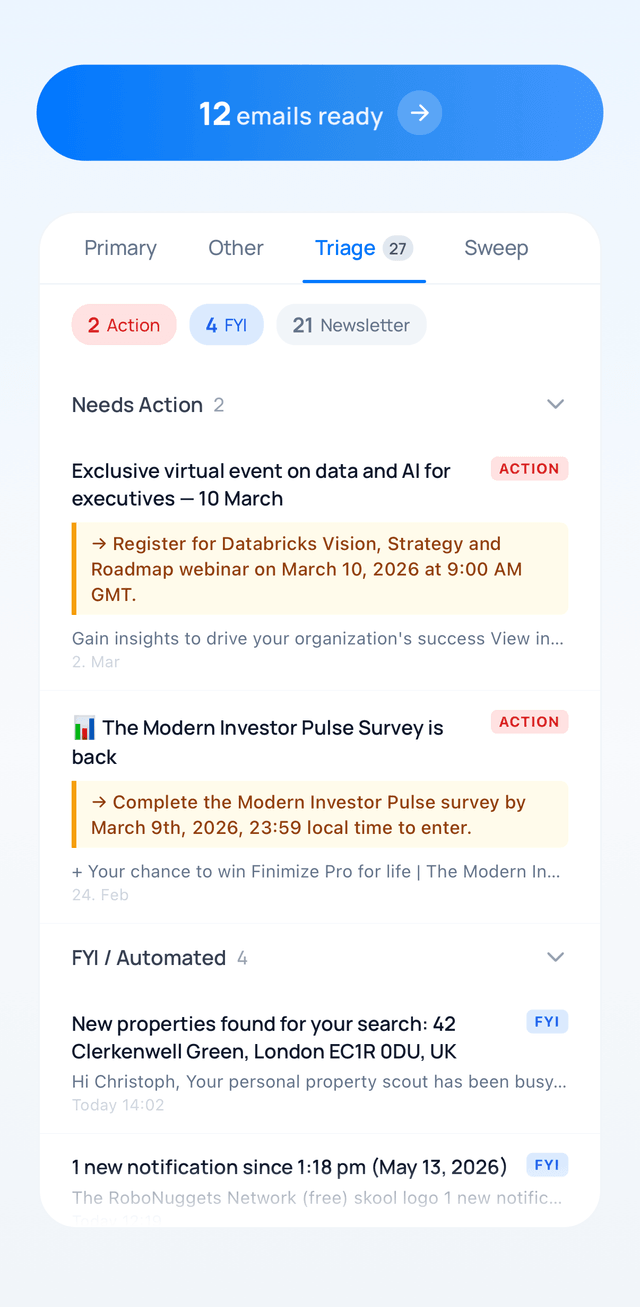
Swizero takes a fundamentally different approach than every other tool on this list. Instead of giving you AI to process an infinite inbox faster, it uses AI to decide what belongs in your inbox at all, then caps what you see at a fixed card limit. Each card gets an AI-generated summary distilled to its essence. Four-direction swipes handle every outcome: down to archive, left to delete, right to flag, up to reply. When the stack is empty, email is finished for that session.
1. Rank
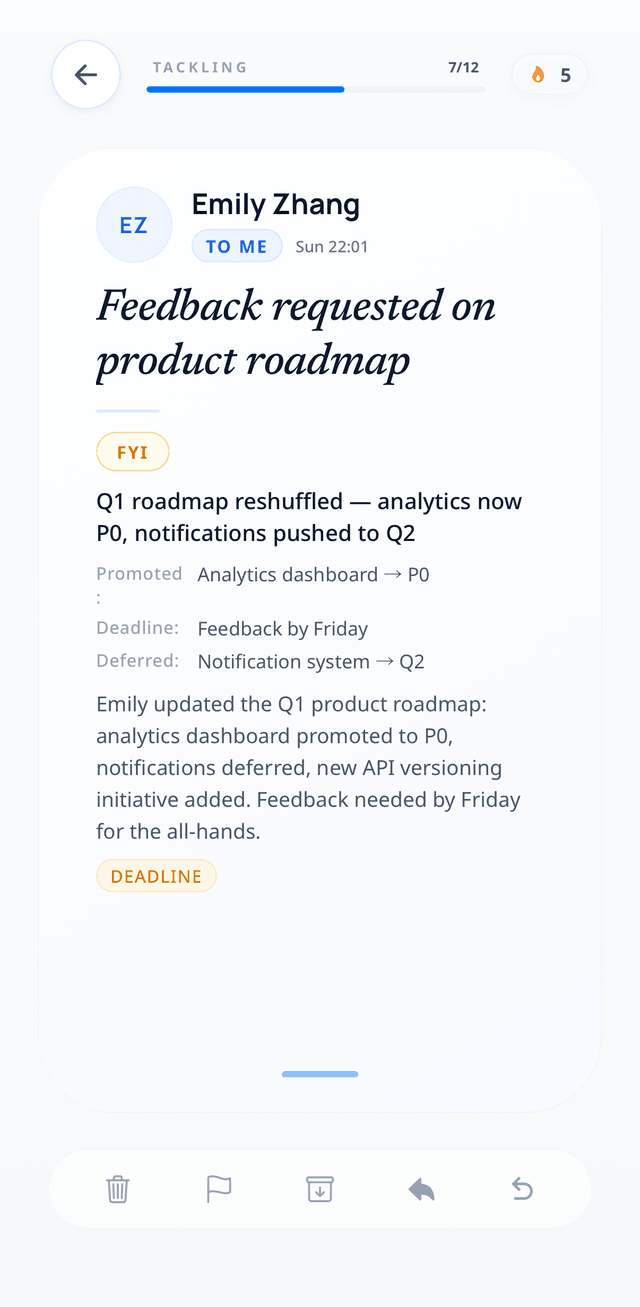
2. Swipe
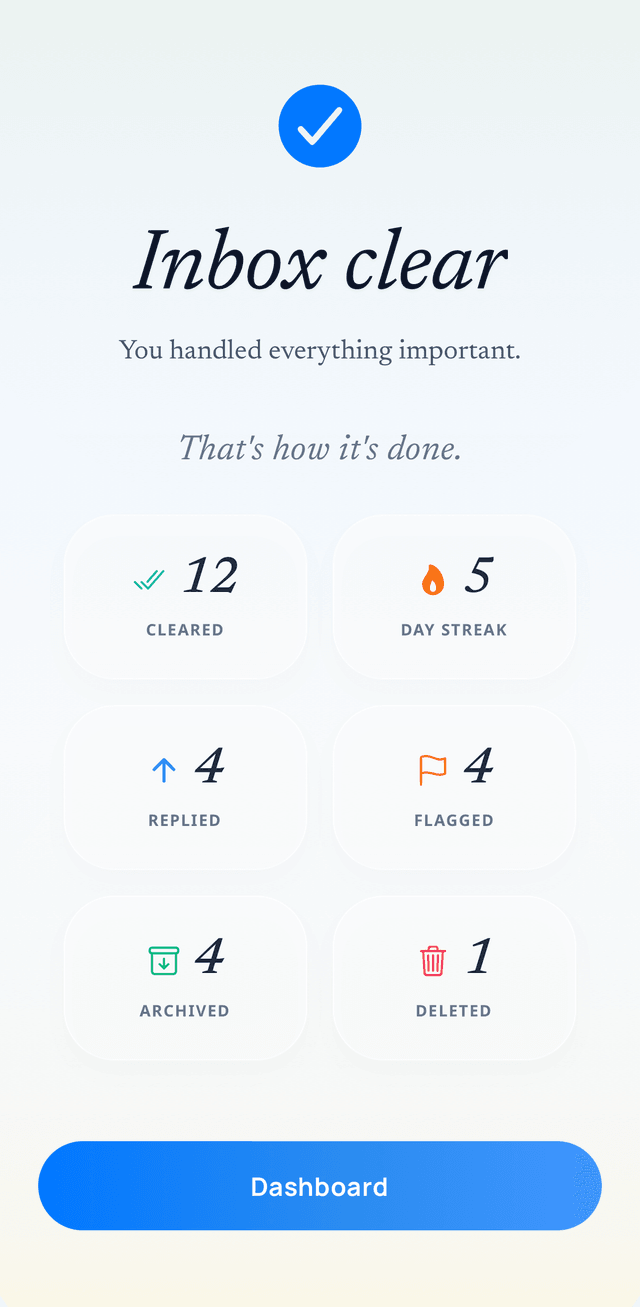
3. Done
The whole loop: rank what matters, swipe it away one-handed, reach an empty stack. The third screen is the one no other app on this list has.
The AI ranking runs on-device using local heuristic scoring. Summaries and draft replies use zero-retention cloud processing, meaning the AI provider does not store or train on your email content. For users who care about what actually happens to their data when AI reads their email, this hybrid architecture is materially different from tools that send everything to a cloud model.
The draft reply feature generates responses in your voice, but nothing sends without explicit approval. Every action is undoable. The entire experience is designed for one-handed mobile use.
Strengths: The fixed card limit makes email a completable task rather than an endless scroll. Privacy architecture is best-in-class for an AI-powered tool. Pricing is significantly below Superhuman and Fyxer.
Limitations: Gmail only at launch. No desktop client. Currently in pre-launch (waitlist). The philosophy requires accepting that AI decides what makes the cut, which may frustrate users who want to see everything.
Honest take: Swizero is the only tool here that addresses the structural problem: email has no finish line. If you have tried speed-first tools and still feel buried, that is not a speed problem. It is a boundary problem. Swizero is built for that realization. If you want manual control over every message, a different tool is a better fit.
Superhuman: Best AI Email Assistant for Speed#
- Price: $33/mo billed annually ($396/yr, Business plan required)
- Best for: High-volume professionals who want the fastest possible email throughput
- Providers: Gmail, Outlook
In July 2025, Grammarly acquired Superhuman for approximately $825 million and completed the transaction in October 2025. The parent company subsequently rebranded itself as Superhuman, combining the email client with Coda and Grammarly’s writing tools under one subscription. Superhuman Mail is no longer available as a standalone product. You must subscribe to the full suite at $33/month.
The AI features have sharpened since the acquisition. Auto Drafts prepares follow-up emails in your voice before you open them, learning from your sent history. Auto Labels and Auto Archive sort incoming messages automatically. The keyboard-first interface remains the fastest email interaction model on the market, and for users who process hundreds of messages daily, that speed advantage is real.
Strengths: Unmatched processing speed. Keyboard shortcuts are the gold standard. AI drafts in your voice are genuinely useful. Supports both Gmail and Outlook.
Limitations: At $396/year, it is the most expensive tool in this comparison by a wide margin. The Grammarly bundle means you pay for tools you may not need. Superhuman optimizes for throughput, not closure. You finish sessions faster, but the inbox refills at the same rate. For the deeper comparison, see our Swizero vs Superhuman analysis.
Shortwave: Best AI Email Assistant for Gmail Power Users#
- Price: $7/mo (Personal) to $24/mo (Business)
- Best for: Gmail users who want the deepest AI integration at a reasonable price
- Providers: Gmail only
Shortwave was built by former Google engineers who worked on the original Inbox by Gmail, and the lineage shows. Its AI architecture uses Retrieval-Augmented Generation (RAG) to search email by semantic intent rather than exact keywords. If you want to understand how AI email assistants actually work under the hood, RAG is the key mechanism.
The Ghostwriter feature analyzes your entire sent history to learn your vocabulary, cadence, and tone. Emails drafted by its AI read like you wrote them, not like a template. The Tasklet platform launched in late 2025, adding no-code automations that connect your inbox to Slack, Notion, Asana, and HubSpot. For Gmail users who need both writing assistance and workflow automation, this combination is compelling.
Strengths: Best AI writing quality in the category. RAG-based search is genuinely powerful. Tasklet automations are novel and useful. Pricing is reasonable relative to capabilities.
Limitations: Gmail only. No Outlook, Yahoo, or iCloud support. The inbox remains unbounded. Shortwave does not impose structural limits, so you are still processing an infinite queue, just with better tools. See our Swizero vs Shortwave comparison for the philosophical contrast.
Fyxer: Best AI Email Assistant for Autonomous Triage#
- Price: $30/mo (Individual) to $50/mo (Professional)
- Best for: Professionals who want AI to handle triage and meeting notes without manual intervention
- Providers: Gmail, Outlook
Fyxer represents the “autonomous agent” school of AI email assistants, edging closer to what’s now called agentic email than to a traditional assistant. Rather than helping you process email faster, it processes email for you. The AI sorts incoming messages into three buckets: needs a reply, FYI only, and marketing noise. No rules to configure. No filters to maintain. It also drafts replies that match your writing style and joins Google Meet or Teams calls to generate meeting summaries and action items.
According to Fyxer’s own data, 81.2% of users report saving one or more hours daily, with a 90% retention rate after three months.
Strengths: Genuinely hands-off triage. The combination of email sorting and meeting transcription is unique. Works with both Gmail and Outlook. Google-verified and Microsoft-verified integrations.
Limitations: At $30/month, it is expensive for individual use. The three-category sorting system is fixed: you cannot create custom categories. Some users report inconsistency in draft quality, with replies sometimes missing context. Fyxer also charges overage fees when email volume exceeds your plan’s monthly allotment, which makes costs unpredictable for high-volume users.
How Should You Think About AI Email Privacy?#
Before evaluating the remaining tools, it is worth pausing on privacy. Every AI email assistant handles your data differently, and the differences are consequential.
A 2026 Malwarebytes report found that 90% of consumers do not trust AI tools with personal data. For email, the concern is justified: these tools read your most sensitive professional communications.
The tools in this comparison fall into four privacy architectures:
- On-device processing (Canary Mail, Apple Intelligence): AI runs locally. Email content never leaves your device for AI tasks.
- Zero-retention cloud (Swizero): AI processing happens server-side, but with contractual guarantees that content is not stored or used for training.
- Header-only analysis (SaneBox, Clean Email): The AI reads metadata like sender, subject, and timestamp. It never accesses message body content.
- Full cloud processing (Superhuman, Shortwave, Fyxer, Lindy): Email content is sent to cloud AI models for analysis. Vendors vary on retention and training policies.
Our full guide to AI email privacy and what happens to your data covers these architectural differences in depth. The right choice depends on your threat model: a freelancer and a healthcare provider have very different requirements.
If AI reading your email content is a dealbreaker, Swizero uses a hybrid architecture: on-device ranking with zero-retention cloud processing for summaries and drafts. Your email is never stored by Swizero and never used to train AI models.
Lindy: Best AI Email Assistant for Custom Automations#
- Price: Free (400 credits/mo), $19.99/mo (Starter), $49.99/mo (Plus)
- Best for: Technical users who want to build custom email workflows with an AI agent
- Providers: Gmail, Outlook, plus 5,000+ integrations
Lindy is not an email client. It is an AI agent platform that can manage your email as one of many tasks. You define rules, triggers, and actions, and Lindy’s agent executes them autonomously: triaging incoming email, drafting responses, scheduling meetings, qualifying leads, and routing messages to the right people. The agents hold context across sessions and coordinate with each other.
The credit-based pricing model means costs vary with usage. Simple tasks like sending a Slack notification use roughly one credit. Complex multi-step workflows use five to ten or more. For users who would otherwise hire a virtual assistant for email triage, Lindy offers a fraction of the cost with 24/7 availability.
Strengths: Extraordinary flexibility. If you can describe your email workflow in plain language, Lindy can probably automate it. The free tier is genuinely usable for light personal email management. Integration ecosystem is massive.
Limitations: Requires upfront setup and prompt engineering. Not a turnkey solution. The credit system makes costs hard to predict for heavy users. Email is just one of Lindy’s many use cases, so the email-specific features are less polished than dedicated email tools like Shortwave or Superhuman.
SaneBox: Best AI Email Assistant for Quiet Filtering#
- Price: $7/mo (Snack, 1 account) to $36/mo (Dinner, 4 accounts)
- Best for: Users who want AI filtering without switching email clients or exposing message content
- Providers: Any IMAP provider (Gmail, Outlook, iCloud, Yahoo, and more)
SaneBox takes a deliberately conservative approach to AI email. It reads only email headers: sender name, subject line, and timestamp. It never reads message body content. Based on behavioral patterns (which senders you open, which you ignore), it sorts messages into folders like SaneLater, SaneBlackHole, and SaneNews. The AI achieves 98.5% sorting accuracy after one to two weeks of learning.
SaneBox works with any email provider that supports IMAP, which is nearly all of them. It requires no app switch, no new interface to learn. Your existing email client stays exactly the same; SaneBox just moves messages into folders before you see them.
Strengths: Provider-agnostic. Privacy-conscious (header-only analysis). Zero learning curve. The SaneBlackHole feature, where you drag an unwanted sender once and never see them again, is genuinely delightful. 14-day free trial.
Limitations: SaneBox does not draft replies, summarize threads, or generate any content. It is purely a filtering tool. The AI is behavioral pattern matching, not a language model, so it cannot understand context or intent within messages. Feature-gating pushes key tools like SaneReminders and SaneDoNotDisturb to higher-priced tiers.
Canary Mail: Best AI Email Assistant for Privacy#
- Price: Free (basic), $36/yr (Growth with AI), $100/yr (Pro+ security)
- Best for: Privacy-first users who want AI features with on-device processing and encryption
- Providers: Gmail, Outlook, iCloud, and other IMAP providers
Canary Mail combines AI email features with built-in encryption. The AI-powered inbox prioritization, summaries, and smart drafts can run on-device, meaning email content does not leave your phone for AI processing. Canary also includes OpenPGP encryption, SecureSend for encrypted messages to non-Canary users, and built-in tracking pixel blocking.
The app is HIPAA and GDPR compliant, which makes it relevant for healthcare professionals and European users with strict regulatory requirements. AI features are optional and can be disabled at any time.
Strengths: Strongest privacy guarantees of any tool with AI capabilities in this comparison. On-device AI processing is a genuine differentiator. Encryption features are built-in rather than bolted on. The $36/year Growth plan is extremely affordable for what you get. Lifetime purchase option available.
Limitations: On-device AI is less capable than cloud-based alternatives. Draft quality and summarization depth do not match Shortwave or Superhuman. The interface can feel dated compared to the design-forward competitors. Feature set is narrower than the premium tools.
Clean Email: Best AI Email Assistant for Inbox Cleanup#
- Price: Free (1,000-email limit), $29.99/yr (Premium, 1 account), $49.99/yr (5 accounts)
- Best for: Users who need to clean up a massive backlog and automate ongoing maintenance
- Providers: Any IMAP provider
Clean Email is not an AI email assistant in the traditional sense. It is an inbox cleanup tool that uses metadata-based sorting and community behavior patterns to help you bulk-delete, unsubscribe, and organize email at scale. Smart Folders group messages into 33 categories (social notifications, travel confirmations, financial statements, etc.) for batch action. The Auto Clean feature lets you set rules that run automatically on new incoming mail.
Like SaneBox, Clean Email reads only metadata and headers, never message body content. The privacy-first approach makes it suitable for users who want cleanup without content exposure.
Strengths: Best tool for the initial “inbox reset” task. The free tier is genuinely functional for one-time cleanups. Works with every major email provider. Extremely affordable for ongoing use. Auto Clean rules are powerful once configured.
Limitations: No AI drafting, no summarization, no reply assistance. This is a cleanup and maintenance tool, not an AI assistant. Requires annual billing (no monthly option). The learning curve for Auto Clean rules is steeper than SaneBox’s passive approach.
Which AI Email Assistant Should You Actually Choose?#
The honest answer depends on the problem you are trying to solve. Here is a decision framework based on what we observed.
If the problem is speed on high volume: Superhuman remains the fastest way to process a large email load. The keyboard shortcuts are unmatched, and the AI drafts have improved since the Grammarly acquisition. You will pay a premium for it.
If the problem is Gmail depth at reasonable cost: Shortwave offers the best AI writing and search features for Gmail users, at roughly half the annual cost of Superhuman.
If the problem is autonomous triage: Fyxer handles sorting, drafting, and meeting notes without manual intervention. Lindy offers more flexibility for technical users willing to build custom workflows.
If the problem is filtering without switching tools: SaneBox and Clean Email both work inside your existing email client. SaneBox is better for ongoing filtering; Clean Email is better for cleaning up a backlog.
If the problem is privacy: Canary Mail offers on-device AI with encryption. SaneBox and Clean Email avoid reading message content entirely. Swizero’s zero-retention cloud architecture splits the difference between capability and privacy.
If the problem is that email has no finish line: That is the question none of the throughput tools answer. Speed tools and filtering tools share the same assumption: that the goal is handling more messages more efficiently, forever. A growing body of research questions that assumption. The 2026 Federal Reserve analysis found that AI adoption is increasing the speed, density, and complexity of knowledge work rather than reducing total load. Email volume is up 28% since 2020 while burnout has climbed to 68%.
Honestly, I expected the testing to reveal a clear winner across all categories. It did not. What it revealed is that the category itself is fracturing. The tools solving “faster email” and the tools solving “finished email” are answering different questions entirely. The right choice requires being honest about which question you are actually asking.
Frequently Asked Questions#
What is the best AI email assistant in 2026?#
The best AI email assistant in 2026 depends on what you need. Superhuman is fastest for high-volume processing. Shortwave offers the deepest AI features for Gmail users. Fyxer provides autonomous triage. SaneBox filters quietly without switching apps. Canary Mail leads on privacy. Swizero is the only tool that imposes a structural limit on your inbox, turning email into a completable task.
Are AI email assistants safe to use with work email?#
Safety depends on the tool’s data architecture. SaneBox and Clean Email read only email headers, never message body content. Canary Mail processes AI on-device. Most other tools send email content to cloud AI models with varying retention policies. Before connecting work email, verify the vendor’s SOC 2 compliance, data retention policy, and whether your email content is used for model training.
How much time can an AI email assistant actually save?#
A Worklytics analysis of knowledge worker behavior found a 25% reduction in email processing time per task with AI-powered tools. Vendors claim considerably more than that, but those are self-reported figures from the companies selling the tools, so treat them as marketing rather than evidence. Actual savings vary significantly based on email volume, the tool used, and how it is configured.
Which AI email assistant works with Outlook?#
Superhuman, Fyxer, Lindy, SaneBox, Canary Mail, and Clean Email all support Outlook. Shortwave is Gmail-only. Swizero currently supports Gmail only, with Outlook support planned.
Is there a free AI email assistant that actually works?#
Lindy offers 400 free credits per month, enough for light personal use. Clean Email has a permanent free tier with a 1,000-email cleanup limit. Canary Mail’s basic plan is free with optional paid AI features. Gmail’s built-in Gemini AI provides summaries, Smart Compose, and Help Me Write at no cost for personal accounts.
Sources#
- AI Email Assistant Market Size to Surpass USD 8.90 Billion by 2035. Precedence Research, 2026. Market projected at $1.13B in 2026 with 25.8% CAGR.
- Work Trend Index 2025: Breaking Down the Infinite Workday. Microsoft, 2025. 117 emails received per day; an interruption every two minutes, about 275 per working day.
- Grammarly Acquires AI Email Client Superhuman. TechCrunch, July 2025. Acquisition completed October 2025 for approximately $825 million.
- Grammarly Rebrands Company as Superhuman. Superhuman official announcement, October 2025.
- Shortwave Deep Dive: The World’s Smartest Email AI. Shortwave Engineering Blog. Technical architecture including RAG and semantic search.
- Monitoring AI Adoption in the U.S. Economy. Federal Reserve, April 2026. AI increasing speed and density of knowledge work rather than reducing total load.
- Worklytics Knowledge Worker Analysis. Worklytics, 2025. AI email tools reduce processing time by 25% per task.
- 90% of Consumers Don’t Trust AI With Personal Data. Malwarebytes, 2026. Consumer trust survey on AI and personal data.
Your inbox doesn't have to feel like this.
A different approach to email, side by side.
See how Swizero compares